
Video editing guide
How to Make a Tier List Video in Cutiz
Published by Cutiz ·
To make a tier list video, choose a subject, define the ranks, record your board and explanation, then edit the sequence in Cutiz. Start with a readable S–F layout and give each placement a reason. Your finished video should make it easy to identify the item, understand the decision and see where it lands.
This walkthrough uses a board recording as the source footage. You can also include a reaction clip if your expression or demonstration adds something useful. The downloadable layouts in our tier list templates collection give you a starting point for either approach.
Make your tier list video in Cutiz
The workflow: Choose the rule · Prepare the board · Record · Edit in Cutiz · Review and export
1. Choose one rule for your ranking
A tier list video becomes hard to follow when the judging rule changes halfway through. Decide whether you are ranking favorites, value, usefulness, difficulty or another specific quality. Put that criterion in the opening and on the board.
For a worked example, imagine ranking your own breakfast recipes by how practical they are on a busy morning. You might consider preparation, cleanup and whether you would make the recipe again. An elaborate weekend dish could rank highly for taste but poorly for that particular use. Explain that distinction before viewers assume the grade means something broader.
Write one sentence for each placement: “[Item] belongs in [rank] because [reason].” If you cannot finish the reason, decide whether the item belongs in this video. The tier list maker guide has a sample S–F scale you can adapt.
2. Choose and customize your tier list template
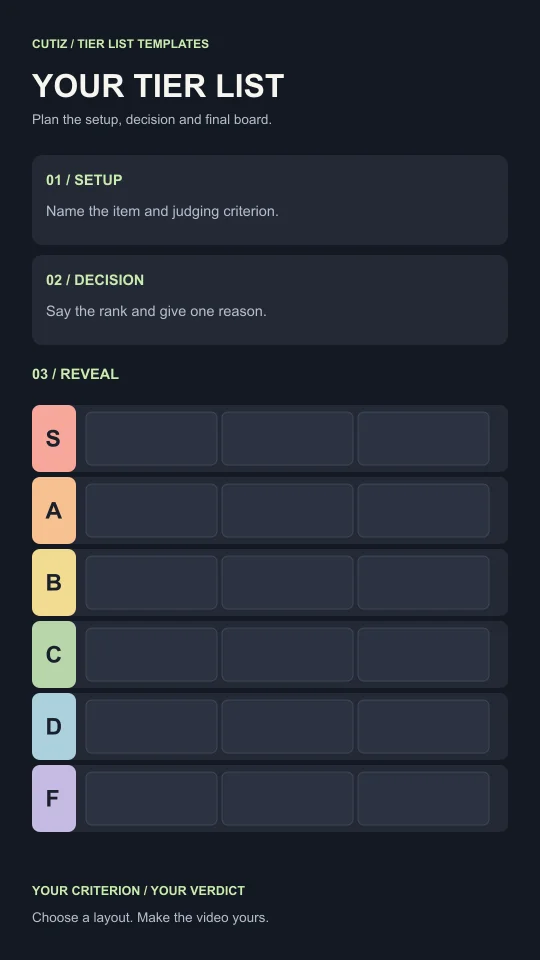
Pick the classic board if viewers mainly need the complete ranking. Use the item spotlight when the current item needs a larger view. Choose the reaction board if the speaker should stay visible.
Download the PNG or editable SVG, then add your subject, criterion and item images in an image or vector editor. These are standalone design files. Prepare the ranking there before capturing the video that you will edit in Cutiz.
Make the board readable before adding motion. Use short item names, consistent image crops and ranks that remain distinguishable without relying on color alone. The supplied layouts retain letter labels for that reason. A viewer should be able to pause the video and understand the final arrangement.
3. Record the ranking and your explanation
Record the board while revealing or placing the items. If you want a reaction view, record your commentary as footage you can use in the edit. On supported Apple devices, the built-in screen recording feature provides a way to capture the board; Apple's screen recording instructions explain the device controls.
Do a short sample first and play it back. Check that the board is legible and that the audio you expected is present. Avoid discovering a missing explanation after recording the entire ranking.
Leave a moment around each decision. A little extra footage before and after a placement gives you room to choose a clean edit point. If you stumble over a sentence, repeat that sentence and continue. You can trim the unwanted attempt in Cutiz.
Keep source material that helps viewers evaluate the choice. In the breakfast example, a brief look at the cleanup could explain the rank better than another sentence about convenience. Use footage and images you created or have permission to use.
4. Build the tier list video in Cutiz
Bring your recording into Cutiz and work from the strongest opening. Trim the part where you get the board ready, check the recording or explain material the audience does not need. The first useful moment is usually where the topic and judging rule become clear.
Use the timeline to arrange the decisions. You can follow the order of the board, group similar items together or save a genuinely surprising placement for later. Keep the spoken references accurate when you reorder: “as I said earlier” will sound wrong if that earlier section now appears afterward.
If you have a separate reaction clip, use video layers or split-screen to give the speaker and the board enough room. Check the framing at actual phone size. A full board squeezed into a corner may preserve every item technically while making none of them readable.
The aim is a sequence viewers can follow without reconstructing what happened. For each item, show enough context to identify it, keep the reason close to the verdict, and make the final placement clear.
Edit your tier list video in Cutiz
5. Use text to make the decision clear
Animated text in Cutiz can introduce the criterion, identify the current item or emphasize a verdict. Use it where it answers a question the viewer might have. A short “Best for busy mornings” label can do more than a large block repeating every spoken sentence.
Keep added text away from the rank labels and item names. The board is already carrying information, so every extra layer needs a reason to be there. Show an item name during its introduction and the rank during its placement, rather than displaying several competing labels throughout the whole clip.
If you add captions, review their wording and placement against the board. Pay particular attention to names and unusual terms. For a ranking, one incorrect item name can make an otherwise clean edit confusing.
6. Tighten the pacing without rushing the reveal
Listen for repeated reasons, dead time and transitions that delay the next decision. Cutiz's reversible silence removal gives you a way to shorten empty pauses. Review the result rather than treating every silence as unnecessary: the moment before a placement can be part of the explanation.
Voice denoising can help with distracting background noise in the recorded commentary. Listen again after applying it, especially around the quietest words. Clear speech matters more than making the background sound perfectly empty.
Keep visual effects purposeful. A transition can mark a change of item; a clean cut can keep the argument moving. The ranking should remain understandable even when a viewer does not notice the editing technique.
7. Review the finished tier list video
Finish with a readable view of the final board. If you revised a placement during the discussion, make sure the last board reflects that change. Leave enough time for a viewer to inspect it without guessing where an item ended up.
Watch the completed export from beginning to end. Check the subject and criterion, the order of the decisions, the correspondence between speech and ranks, and the placement of text. Listen for a word cut off at an edit point or an abrupt jump between clips.
For the closing line, ask a question that follows from your rule: “Which recipe would move up if cleanup did not matter?” It invites a more specific response than asking whether viewers agree with everything.
Make your first tier list video
Choose one topic you can explain, pick a tier list template, and record the placements. You can make a clear tier list video with a simple board and a good reason for each decision.
Cutiz gives you the editing tools to turn that recording into a deliberate sequence: trim, reorder, add text, review the sound and finish the video.